

Meta AI has quietly revolutionized how we interact with social media platforms, and nowhere is this more apparent than in Facebook Messenger. This powerful AI assistant brings advanced conversational capabilities, image generation, and smart search features directly to your messaging experience. Understanding how to use Meta AI in Facebook Messenger can transform your daily communication and productivity.
Whether you’re looking to enhance conversations with friends, generate creative content, or streamline your messaging workflow, Meta AI offers a suite of tools that make Messenger more intelligent and versatile. This comprehensive guide will walk you through everything you need to know to master Meta AI’s capabilities within Facebook Messenger.
Table of Contents
What is Meta AI and How Does it Work in Messenger?
Meta AI represents Meta’s ambitious foray into generative artificial intelligence, designed to seamlessly integrate across the company’s family of apps including Facebook, Instagram, WhatsApp, and Messenger. This conversational AI assistant leverages advanced machine learning models to understand context, generate responses, and perform complex tasks through natural language interaction.
In Messenger specifically, Meta AI functions as your personal assistant, capable of answering questions, generating images, helping with creative projects, and facilitating group conversations. The integration feels natural and intuitive, allowing users to access powerful AI capabilities without leaving their familiar messaging environment.
The technology behind Meta AI combines natural language processing, computer vision, and generative capabilities to provide comprehensive assistance. When you interact with Meta AI in Messenger, you’re tapping into the same foundational models that power other cutting-edge AI systems, but with the added benefit of Meta’s extensive social media data and user interaction insights.
Getting Started: Setting Up Meta AI in Messenger
Accessing Meta AI for the First Time
To begin using Meta AI in Facebook Messenger, you’ll need to ensure your app is updated to the latest version. Meta AI is gradually rolling out to users, so availability may vary depending on your region and account status. Once available, you’ll notice a new AI chat option or the ability to mention Meta AI in conversations.
The setup process is straightforward—simply open Messenger and look for the Meta AI icon or search for “Meta AI” in your contacts. You can start a new conversation with Meta AI just like you would with any other contact. The system will guide you through initial setup and explain its basic capabilities.
For users interested in exploring advanced AI features, understanding how Meta Foresight enhances the platform’s predictive capabilities provides valuable context for maximizing your experience with these tools.
Understanding Meta AI’s Interface
Meta AI’s interface in Messenger maintains the familiar chat layout while adding specialized features. You’ll notice new buttons for image generation, quick prompts, and suggestion bubbles that help guide your interactions. The AI responds with formatted text, images, and interactive elements that make conversations more engaging and productive.
The command structure is intuitive, allowing you to use natural language or specific commands like /imagine for image generation. Meta AI also provides helpful hints and suggestions based on your conversation history and common use cases.
Core Features and Capabilities
Conversational AI and Chat Assistance
Meta AI excels at natural conversation, answering questions across a wide range of topics from current events to technical explanations. The AI can maintain context throughout lengthy conversations, remember previous topics, and provide increasingly relevant responses as it learns more about your preferences and communication style.
For business users, Meta AI can assist with professional communications, helping draft messages, summarize long conversations, and even suggest appropriate responses in different contexts. This makes it particularly valuable for those managing multiple conversations or needing assistance with professional correspondence.
Recent developments in AI for brand strategy demonstrate how conversational AI is becoming essential for maintaining consistent communication across digital platforms.
Image Generation with the /imagine Command
One of Meta AI’s most popular features is its ability to generate custom images directly within Messenger conversations. Using the /imagine command followed by a detailed description, users can create personalized artwork, illustrations, and visual content without leaving the chat interface.
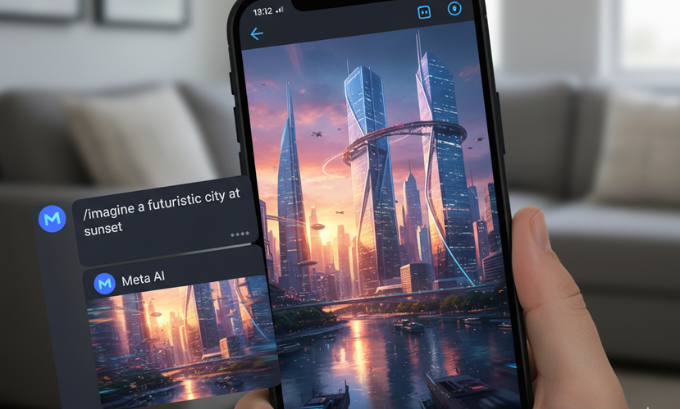
The image generation capabilities are powered by advanced diffusion models that can create high-quality, contextually relevant images. Whether you need a quick illustration for a presentation, want to create fun images for friends, or need visual content for social media, the /imagine command provides instant access to creative tools.
Meta AI Search and Information Retrieval
Meta AI’s search capabilities extend beyond simple web queries, offering contextual information that’s relevant to your current conversation or needs. The AI can pull information from multiple sources, synthesize complex topics, and present findings in easily digestible formats.
This feature is particularly useful for settling debates in group chats, researching topics of interest, or getting quick explanations of complex subjects. Meta AI can provide current information while maintaining conversational flow, making it feel like having an knowledgeable friend in the conversation.
For those interested in the broader implications of AI search technologies, exploring trends in cybersecurity for 2025 provides insight into how these systems are being secured and developed.
Using Meta AI in Group Chats
Activating Meta AI in Group Conversations
To bring Meta AI into group conversations, simply use the @Meta AI command followed by your query or request. This allows the AI to contribute to group discussions, answer questions that benefit all participants, and provide information that enhances the collective conversation experience.
Group integration is designed to be non-intrusive, with Meta AI only responding when specifically called upon. This ensures the AI enhances rather than dominates group dynamics, providing valuable contributions when requested while maintaining the natural flow of conversation.
Collaborative Features and Shared Activities
Meta AI can facilitate collaborative activities within group chats, such as planning events, brainstorming ideas, or creating shared content. The AI can help coordinate schedules, suggest activities, and even generate visual content that all group members can enjoy and build upon.
These collaborative features are particularly valuable for project teams, study groups, or friend circles planning activities. Meta AI can serve as a neutral facilitator, providing information and creative input that helps groups make decisions and move forward with their plans.
Advanced Meta AI Commands and Features
Creative Content Generation
Beyond basic image generation, Meta AI offers sophisticated creative tools for content creation. Users can request specific artistic styles, generate variations on themes, and even create series of related images for storytelling or presentation purposes.
The AI can also assist with written content, helping craft everything from casual social media posts to more formal communications. This capability is enhanced by the AI’s understanding of different tones, audiences, and communication contexts.
Business and Productivity Applications
For entrepreneurs and small business owners, Meta AI provides valuable support for various business activities. From drafting professional emails to creating marketing visuals, the AI can handle routine tasks that typically require multiple applications or specialized skills.
The integration with Messenger makes these business features particularly accessible for teams already using Meta’s platforms for communication. This seamless integration reduces the need to switch between applications, improving workflow efficiency.
Business owners exploring affordable accounting software for startups will find that AI-powered tools like Meta AI complement these platforms by providing communication and creative support.
Meta AI vs Other AI Assistants
Comparing Features and Capabilities
Meta AI’s integration within Messenger provides unique advantages compared to standalone AI assistants. The contextual awareness from social media interactions, combined with native integration in a platform billions use daily, creates a more seamless user experience than switching between separate applications.
While other AI assistants may offer more specialized features in certain areas, Meta AI’s strength lies in its accessibility and social integration. Users don’t need to learn new interfaces or download additional apps to access powerful AI capabilities.
Integration Benefits and Limitations
The deep integration with Meta’s ecosystem provides significant benefits, including access to your social graph, conversation history, and platform-specific features. However, this integration also means the AI is primarily optimized for Meta’s platforms and may not offer the same flexibility as platform-agnostic alternatives.
Understanding these trade-offs helps users make informed decisions about when to use Meta AI versus other AI tools in their digital toolkit.
Privacy and Security Considerations
Data Handling and User Privacy
Meta AI’s integration with Messenger raises important questions about data privacy and usage. The AI system processes conversation data to provide relevant responses, but Meta has implemented various privacy controls and user options for managing data sharing.
Users should review their privacy settings and understand how their interactions with Meta AI are used to improve the service. Meta provides transparency tools and controls that allow users to manage their data preferences and AI interaction history.
Recent developments in cybersecurity trends for 2025 highlight the importance of understanding privacy implications when using AI-powered communication tools.

Security Best Practices
When using Meta AI in Messenger, it’s important to follow security best practices such as avoiding sharing sensitive personal information, being cautious about generated content accuracy, and regularly reviewing privacy settings.
Users should also be aware that AI-generated content, while impressive, can sometimes contain inaccuracies or biases. Fact-checking important information and using critical thinking when evaluating AI responses ensures safe and effective use of the technology.
Troubleshooting Common Issues
Technical Problems and Solutions
Common issues with Meta AI in Messenger include connectivity problems, delayed responses, and feature availability limitations. Most technical issues can be resolved by updating the Messenger app, checking internet connectivity, and verifying that Meta AI is available in your region.
For persistent problems, Meta’s support resources provide troubleshooting guides and community forums where users can find solutions to common issues and share experiences with other Meta AI users.
Feature Availability and Regional Differences
Meta AI features may not be available in all regions or for all users simultaneously. The rollout process prioritizes different markets and user segments, which can result in varying feature availability and capabilities.
Users experiencing limited functionality should check Meta’s official announcements and support pages for updates on feature availability in their region. The company regularly expands access to new markets and user groups.
For those interested in staying updated on the latest technology developments, exploring information about the Consumer Electronics Show 2025 provides insight into broader AI and technology trends.
Creative Applications and Use Cases
Content Creation for Social Media
Meta AI’s image generation capabilities make it an excellent tool for creating social media content. Users can generate custom graphics, illustrations, and visual content that matches their personal or brand aesthetic without requiring design skills or expensive software.
The AI can create content optimized for different social media platforms, understanding aspect ratios, visual trends, and platform-specific requirements. This makes it particularly valuable for content creators, small businesses, and individuals looking to enhance their social media presence.
Educational and Learning Applications
Meta AI serves as an educational tool within Messenger, capable of explaining complex concepts, providing study assistance, and generating educational materials. Students can ask questions about various subjects and receive detailed explanations tailored to their level of understanding.
The conversational nature of the AI makes learning interactive and engaging, allowing students to ask follow-up questions and explore topics in depth. This personalized learning approach can supplement traditional educational resources and provide additional support for academic success.
Future Developments and Roadmap
Upcoming Features and Improvements
Meta continues to enhance Meta AI’s capabilities, with planned improvements including better language support, more sophisticated image generation, and enhanced integration with other Meta platforms. These developments will expand the AI’s usefulness and accessibility for global users.
Future updates may include voice interaction capabilities, improved context awareness, and more specialized tools for different user types and use cases. Meta’s investment in AI research suggests continued rapid improvement in the platform’s capabilities.
Integration with Other Meta Platforms
The roadmap for Meta AI includes deeper integration across Instagram, WhatsApp, and Facebook, creating a unified AI experience across Meta’s ecosystem. This integration will allow users to maintain context and preferences across platforms while accessing AI capabilities wherever they’re most needed.
Cross-platform integration will also enable more sophisticated features that leverage data and interactions from multiple sources, providing more personalized and contextually relevant AI assistance.
Those interested in learning more about AI developments can explore comprehensive guides about what is Meta AI and its broader applications across Meta’s platform ecosystem.
Frequently Asked Questions
How do I start using Meta AI in Facebook Messenger?
Ensure your Messenger app is updated, then look for Meta AI in your contacts or start a conversation by searching for “Meta AI.” The feature is rolling out gradually, so availability may vary by region.
Can I use Meta AI in group chats?
Yes, you can add Meta AI to group conversations by using the @Meta AI command followed by your question or request. The AI will respond to the group while maintaining conversation flow.
Is there a cost to use Meta AI in Messenger?
Currently, Meta AI is free to use within Messenger. However, Meta may introduce premium features or usage limits in the future as the service evolves.
What types of images can Meta AI generate?
Meta AI can create various types of images including illustrations, artwork, scenes, and conceptual visuals using the /imagine command. The AI follows content policies and may restrict certain types of image generation.
How does Meta AI protect my privacy?
Meta AI processes conversation data to provide responses but offers privacy controls and settings for managing data usage. Users should review their privacy settings and understand how their interactions are used.
Can Meta AI help with business tasks?
Yes, Meta AI can assist with various business activities including drafting communications, creating marketing visuals, answering customer questions, and providing information for business decisions.
What should I do if Meta AI isn’t working properly?
First, ensure your Messenger app is updated and you have a stable internet connection. Check if Meta AI is available in your region, and consult Meta’s support resources for troubleshooting specific issues.
If you want to learn more about how to use Meta AI in Facebook Messenger, you can visit these comprehensive resources: mindjournal.co, techbullion.in, and gogonihon.jp.net for additional insights and tutorials.
Maximizing Your Meta AI Experience
Understanding how to effectively use Meta AI in Facebook Messenger opens up new possibilities for communication, creativity, and productivity. As this technology continues to evolve, users who master its current capabilities will be best positioned to take advantage of future enhancements and features.
The key to success with Meta AI lies in experimentation and regular use. Try different commands, explore various creative applications, and integrate the AI into your daily messaging routine. Whether you’re using it for personal conversations, business communications, or creative projects, Meta AI represents a significant step forward in making advanced AI capabilities accessible to everyone.
By following the strategies and techniques outlined in this guide, you’ll be able to harness the full potential of Meta AI in Messenger, transforming your messaging experience and discovering new ways to communicate and create in the digital age.
