

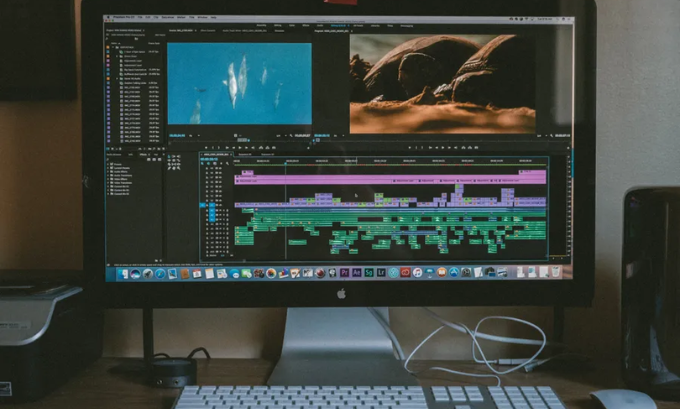
Finding the best video editing software for beginners can feel overwhelming with so many options available. Whether you want to create YouTube content, social media videos, or professional-looking projects, the right tool can make all the difference. In this guide, we’ll explore beginner-friendly software, highlight their unique features, and give you actionable advice to start editing like a pro.
For more insights on technology tools, you may visit TechBullion. You can also check Ponta Tech Mahindra University to learn about related tech resources.
Table of Contents
1. Clipchamp: Beginner-Friendly Editing on Windows
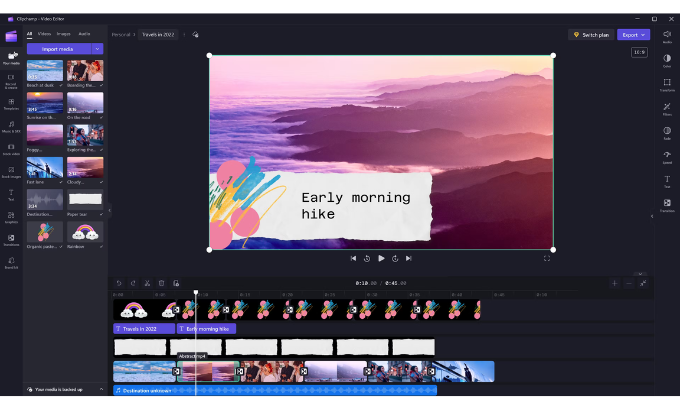
Clipchamp is a perfect starting point for beginners who want simplicity without sacrificing quality. Its drag-and-drop interface, pre-built templates, and cloud-based storage make video creation straightforward. You can also record your screen or webcam directly within the tool.
Strengths:
- Intuitive drag-and-drop workflow
- Multiple export options including 1080p
- Built-in AI tools for subtitles and noise removal
Areas for Improvement:
- Advanced features require a paid plan
- Limited color grading compared to pro tools
For a detailed guide on using AI-powered tools, check MindJournal.
2. CapCut: AI-Powered Editing Across Devices
CapCut, developed by ByteDance, offers cloud-based workflows allowing seamless editing between mobile and desktop. It’s beginner-friendly yet packed with AI features like Magic Cut, automatic captions, and background removal. Its fast rendering and cross-device support make it a favorite for social media content creators.
Strengths:
- AI-assisted editing speeds up video creation
- Mobile and desktop integration
- Ideal for short-form content
Areas for Improvement:
- Some premium effects require a pro subscription
- Free version may include watermark limits
If you want to explore AI editing tools further, visit TechBullion: Work with Artificial Intelligence.
3. DaVinci Resolve: Professional-Grade Editing for Beginners Who Want Growth
DaVinci Resolve by Blackmagic Design is renowned for its Fusion visual effects, Fairlight audio tools, and professional color grading. While it has a steeper learning curve, beginners willing to learn can leverage its powerful free version to grow into advanced editing.
Strengths:
- Industry-standard color grading and audio tools
- Fusion VFX for motion graphics
- Collaborative cloud-based workflows
Areas for Improvement:
- High system requirements
- Can feel overwhelming for absolute beginners
To understand more about professional video software, check Link Luminous.
4. PowerDirector: Fast and Feature-Rich Editing
PowerDirector is a beginner-friendly editor known for fast rendering, a large library of Lens Flare Presets, and professional effects. Its workflow is intuitive and allows users to produce polished videos quickly without extensive training.
Strengths:
- Lightning-fast rendering
- Wide range of cinematic effects
- Beginner-friendly yet professional tools
Areas for Improvement:
- Some advanced effects locked behind premium plan
- Occasional interface clutter for new users
For more tips on using beginner-friendly editors, visit MindJournal AI Tools.
5. Movavi Video Editor: Clean, Simple, and Effective
Movavi Video Editor balances simplicity and creative power. With VFX packs, LUTs, and easy timeline management, it’s ideal for beginners looking to create eye-catching videos without learning complex software.
Strengths:
- Simple interface for beginners
- Lightweight performance for lower-end PCs
- Offers creative effects and transitions
Areas for Improvement:
- Limited advanced editing compared to DaVinci Resolve
- Some premium features are paid
To explore more beginner-friendly tech resources, visit Ponta Tech Mahindra.
Comparison Table of Top Beginner Video Editors
| Software | Platform | AI Features | Ease of Use | Free Version |
|---|---|---|---|---|
| Clipchamp | Windows/Web | Subtitles, Noise Removal | Easy | Yes |
| CapCut | Windows/Mac/Mobile | Magic Cut, AI Voices | Moderate | Yes (Limited) |
| DaVinci Resolve | Windows/Mac/Linux | Fusion, Fairlight | Advanced | Yes |
| PowerDirector | Windows/Mac | Lens Flare Presets | Easy | Yes |
| Movavi | Windows/Mac | LUTs, VFX Packs | Easy | Yes (Limited) |
FAQ Section
Q1: What is the easiest video editing software for beginners?
A1: Clipchamp and Movavi are great starting points due to their intuitive interfaces and drag-and-drop functionality.
Q2: Can I edit videos professionally with beginner software?
A2: Yes. Tools like DaVinci Resolve and PowerDirector allow beginners to grow into professional-level editing.
Q3: Is CapCut suitable for desktop editing?
A3: Absolutely. CapCut supports Windows, Mac, and mobile devices with cloud-sync functionality.
Q4: What is Magic Cut in CapCut?
A4: Magic Cut is an AI feature that automatically trims videos, analyzes scenes, and separates backgrounds for faster editing.
Q5: Are there free options for beginner video editors?
A5: Yes. Clipchamp, DaVinci Resolve, and Movavi offer functional free versions with optional upgrades.
Q6: How can I improve my video editing skills?
A6: Practice regularly, explore AI tools, and check online resources like MindJournal AI Tools and TechBullion AI.
Conclusion: Start Editing Today
Choosing the best video editing software for beginners article boils down to your goals and workflow preferences. For simplicity, start with Clipchamp or Movavi. If you want long-term growth into professional editing, DaVinci Resolve and PowerDirector are excellent choices. Don’t hesitate to experiment and explore AI features for faster content creation.
Author Bio:
Andy Samue is a digital content strategist and video production expert with 8+ years of experience. He specializes in creating SEO-optimized tutorials and guides for beginners and professionals alike.
References:
